Tab Mapper
The tab mapper is a handy little tool that will render a guitar tab file with graphic chord diagrams displayed alongside. This comes in handy for people who just don't have every single chord shape memorized. Just plug in the web site address of a valid .tab or .crd file and hit "Go". In general, the tab mapper does a better job with printer friendly URLs. If there is more than one way to play a chord, the tab mapper will choose the most common shape. To see other fingerings, click on the chord diagram and you will be taken to the chord calculator.
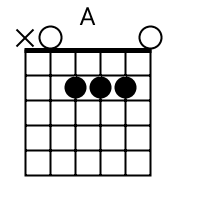
Original file located @ http://expiredpatents.co.
Show me scales that sound good with the chords in this song: A.
Skip to contentIndependent resource guide
Find patents.
Follow the record.
Use the official USPTO tools to search patents and published applications, check an application?s history, and find recorded assignments. Choose the source that answers your research question.
Research opens on the official USPTO websites. No search terms or records are collected here.
Patent Public Search access: USPTO?s published notice sets November 7, 2026 as the start of account sign-in requirements for Patent Public Search. Check the current official access notice.
Choose the tool for the question
Patent Public Search · Advanced
Search U.S. patents and published applications using detailed queries, filters and document tools. Use the official reference materials to learn the search syntax.
Open advanced patent search ?Patent Center
Look up a known application to review its available status, documents and transaction history. Public and signed-in access cover different information.
Open Patent Center ?Patent Assignment Search
Find recorded patent assignments and changes in ownership using the USPTO?s Assignment Center search.
Search recorded assignments ?USPTO search guidance
Find the official search references, quick reference guides, tutorial videos and links to additional patent research resources.
Read official search guidance ?Keep the document and its history together
Start with what you know
Use Basic Search for a patent or publication number, inventor name or keywords. Follow the tool?s number-format instructions rather than guessing a missing digit.
Review the source document
Confirm the publication number, title, named parties and dates in the document you found. Save its official number so you can return to the same record.
Follow the application
Use Patent Center to examine available application records and history. A search result and a current application-status record answer different questions.
For a broader starting point, see USPTO?s patent search resources.
Trademark research guide
Looking for brand names and trademark records? Our companion guide links to official trademark search and status tools.
Open trademark research guide ?Independent resource guide, not affiliated with the United States Patent and Trademark Office. This page links to official services; it does not host a searchable database or provide legal advice. No accounts, forms, advertising trackers or analytics are used here.
Sources: Patent Public Search · USPTO search resources · Patent Center guide (PDF)